4.1.6. Excel Report
4.1.6. Excel Report
After processing, an Excel report is automatically created and
opened. The report is saved in your "Documents" folder
under the file name
BoltReport_YYYYMMDD_HHMMSS.xlsx .
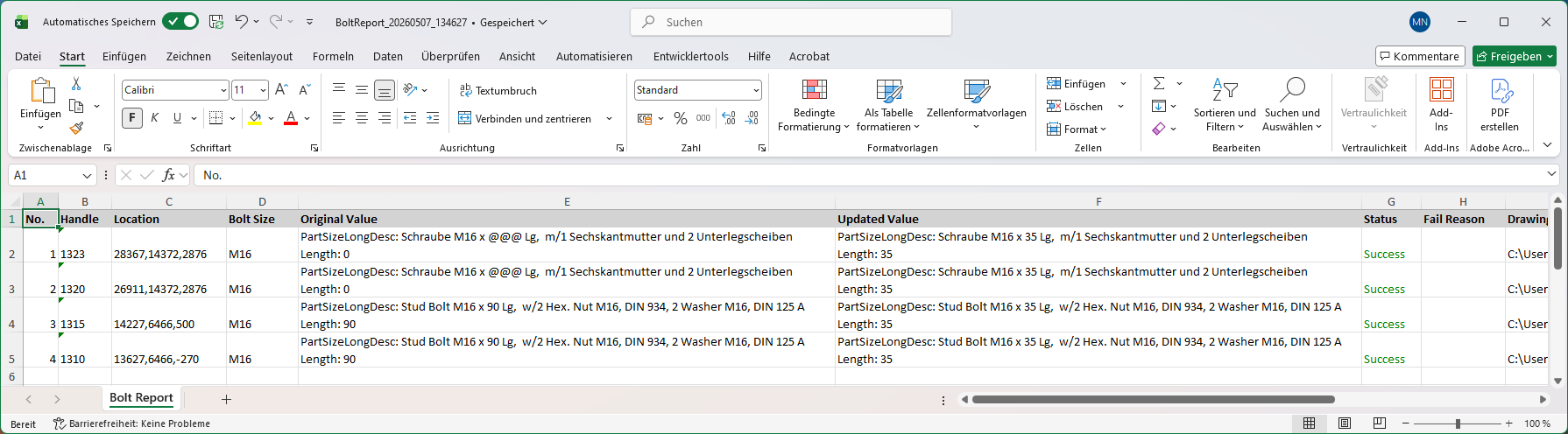
The report contains a single worksheet named "Bolt Report" with the following columns:
| Column | Description |
|---|---|
| No | Sequential line number. |
| Handle | The AutoCAD handle of the bolt connector object. |
| Position | The X, Y, and Z coordinates of the fastener (rounded to integers). |
| Bolt Size | The bolt size designation (e.g., M16). |
| Original Value | The original property values before the update. Shows
PartSizeLongDesc, PartFamilyLongDesc,
Length and
NumberInSet if they were changed. |
| Updated Value | The new property values after the update. |
| Status | Color-coded result: Green = Successful, Orange = Skipped (no changes needed), Red = Failed (calculation error or maximum length exceeded). |
| Reason for Error | Explanation why the update was skipped or failed. |
| Drawing Name | The name of the drawing containing the bolt set. |