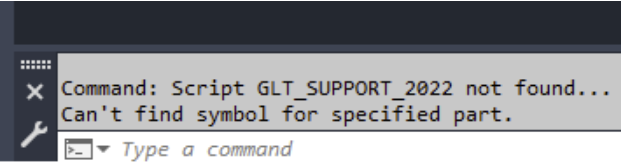
8.2.1. Error message: “Can’t find symbol for specified part”
8.2.1. Error Message: "Can’t find symbol for specified part"
Learn how to resolve the "Can't find symbol for specified part" error message in Plant 3D. Correct configuration of paths and scripts is essential for the error-free placement of components.
Prerequisites
- You are using Autodesk AutoCAD Plant 3D.
- The SuCri extension is installed.
- You have an active license for component placement.
Step-by-Step Instructions
-
Verify Content Paths
Ensure that all relevant catalog and support data are located in the correct content folder. Match the path stored in SuCri with your current project path.
Result: The content (support catalogs, symbols, scripts) can be located again by the software. -
Check and Copy CustomScripts
Manually copy all necessary scripts into the
CustomScriptsfolder if they are missing. If in doubt, use the original scripts from the SuCri installation. -
Register Scripts in Plant 3D
Enter the command PlantRegisterCustomScripts into the Plant 3D command line and press Enter. This officially registers the scripts for the current installation.
-
Check License Status
Check whether your SuCri license is active and still valid. Please note that once trial versions have expired, no new components can be placed.
Important Notes
- Avoid Multiple Installations: If multiple versions of Plant 3D or SuCri are installed in parallel, script path conflicts may occur. Consolidate your system to a uniform version.
- Clean Uninstallation: Leftovers from old versions often cause incorrect paths to be referenced. In case of persistent problems, perform a complete reinstallation.
- Best Practice: Always check the content paths first when error messages appear and run the registration command.
Troubleshooting
- Problem: Components cannot be placed despite correct paths.
Solution: Check whether a license is active; components that have already been placed remain even without a license, which can be misleading regarding the status. - Problem: Scripts are not recognized.
Solution: Run PlantRegisterCustomScripts again and ensure there are no remnants of a faulty uninstallation in theCustomScriptspath.