4.4.3. Control External References
4.4.3. Control External References
Extends the Clip Box functionality with fine-grained control over the visibility, snappability, and selectability of all external references (XRefs) in the current drawing. The function works independently and can also be used in drawings that do not contain a clip box.
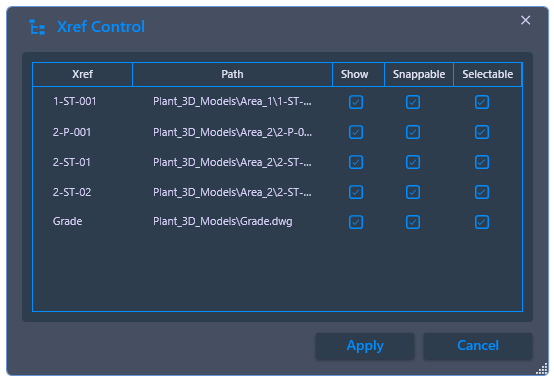
Application benefits: When working in complex models with many external references, AutoCAD object snaps often snap to geometry from these XRefs, leading to incorrectly snapped points. With XRef control, interfering references can be individually set to "visible only" – geometry remains recognizable for orientation, but cannot be selected or snapped.
Ribbon button: Clip Box > XRef
Command: PiCriClipBoxXref
Workflow:
- Start the command. PiCri displays a list of all external drawings referenced in the current drawing.
- For each reference, set the three properties individually: Visible (XRef is displayed), Snappable (object snaps apply to XRef geometry), Selectable (XRef geometry can be clicked and selected).
- Click Apply. The settings take effect immediately – object snaps now only orient to geometry of "snappable" references.
Interaction with the clip box: When a clip box is active, the XRef control acts in addition to clipping. This allows external references within the clip box to be excluded from selection and snapping without making them invisible.