Decimal Separator Issue during ADVS 2026 Report Generation
Optimize the configuration of Autodesk Advance Steel 2026 by adjusting decimal separators. In this article, you will learn how to generate reports correctly and avoid issues with MTO evaluation.
Prerequisites
- Installed version of Autodesk Advance Steel 2026.
- Access to the Windows Control Panel or the BOM Editor within the software.
Step-by-Step Guide
Since Autodesk Advance Steel 2026 (ADVS), the English notation with a period (".") as the decimal separator is apparently increasingly expected. If a comma (",") is stored in your Windows region settings, this leads to incorrect reports.
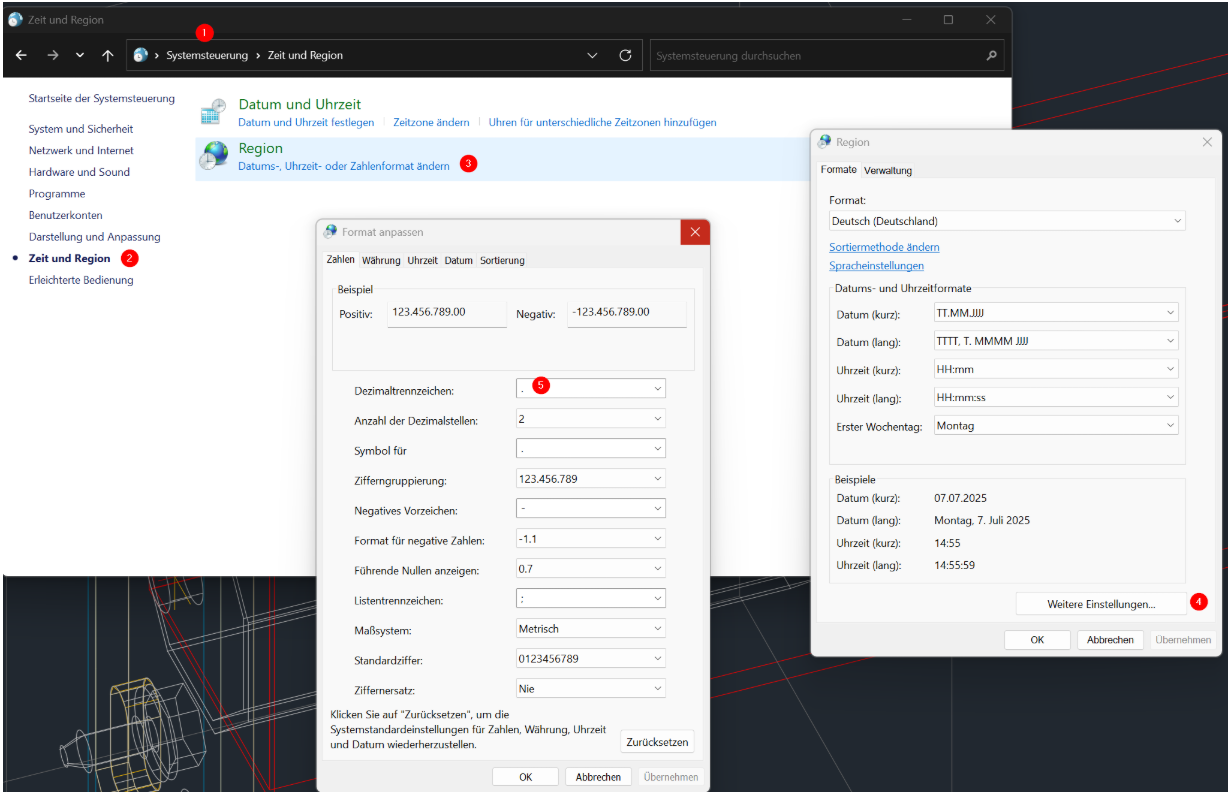
Option 1: Adjusting Windows Region Settings (Recommended)
- Open the Control Panel.
- Navigate to the Time & Language menu item.
- Click on Region or Change date, time, or number formats.
- In the Formats tab, select the Additional settings button.
- In the Decimal symbol field, change the character from
,to.. - Confirm all dialogs with OK.
Result: After this adjustment, the MTO reports will be calculated correctly upon regeneration.
Option 2: Adjustment in the BOM Editor (Alternative)
- Open the BOM Editor in Advance Steel.
- Select the affected report template.
- Find the corresponding weight fields and set the OutputFormat to the value
General.
Result: The system now uses a general format, which bypasses the problem without a global Windows change.
Important Notes
- Best Practice: We recommend the primary solution via the Windows settings to ensure a consistent system configuration across all evaluations.
- Warning: If you use other software solutions that strictly require a comma as a separator, use the alternative solution via the BOM Editor instead.
Troubleshooting
- Problem: Reports still show no values or incorrect totals despite the change.
- Solution: Restart Advance Steel after changing the Windows region settings so that the system variables are read correctly.