4.1.6. Excel Report, Bolt Length Calculation
On this page
After processing, an Excel report is automatically created and
opened. The report is saved in your "Documents" folder
under the file name
BoltReport_YYYYMMDD_HHMMSS.xlsx .
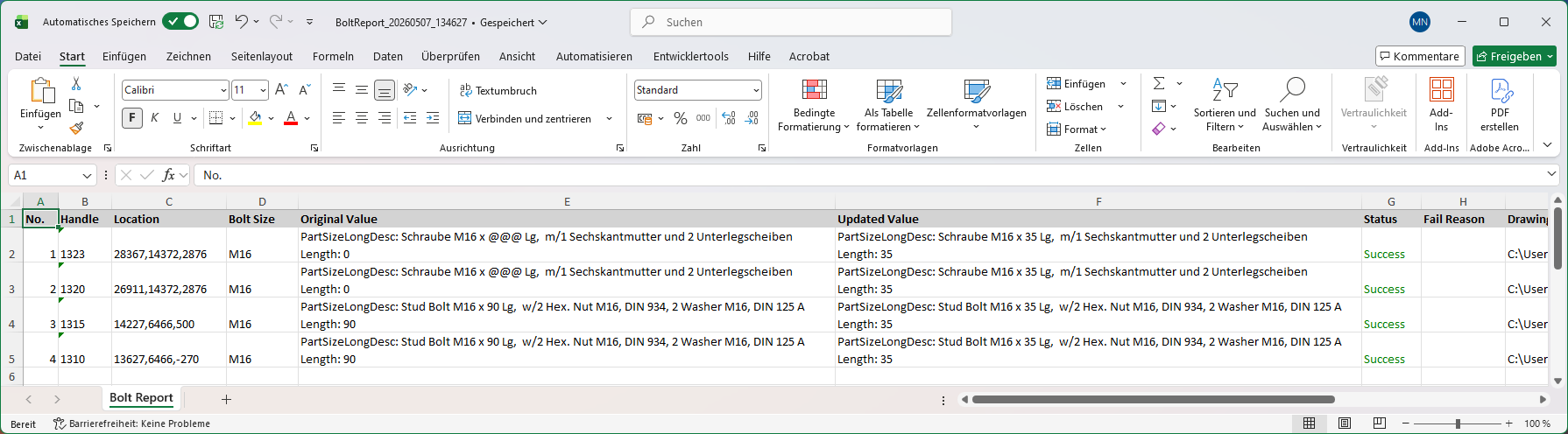
The report contains a single worksheet named "Bolt Report" with the following columns:
| Column | Description |
|---|---|
| No | Sequential line number. |
| Handle | The AutoCAD handle of the bolt connector object. |
| Position | The X, Y, and Z coordinates of the fastener (rounded to integers). |
| Bolt Size | The bolt size designation (e.g., M16). |
| Original Value | The original property values before the update. Shows
PartSizeLongDesc, PartFamilyLongDesc,
Length and
NumberInSet if they were changed. |
| Updated Value | The new property values after the update. |
| Status | Color-coded result: Green = Successful, Orange = Skipped (no changes needed), Red = Failed (calculation error or maximum length exceeded). |
| Reason for Error | Explanation why the update was skipped or failed. |
| Drawing Name | The name of the drawing containing the bolt set. |