4.3.10.11. Internet Info, Open connection dialog (SuCri3ShowSelectConnection)
On this page
Overview
For the parts in the connection dialog, an info point leads directly to the manufacturer's website. There you will find further information about the part.
Where can I find the function?
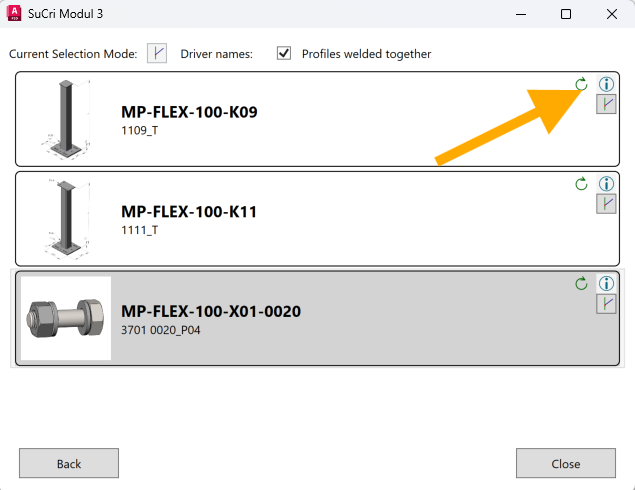
On the selection page of the connection dialog, every entry in the connector list has an info button. For a connection that has already been placed, you open this page via the connection box: right-click, SuCri Connection > Modify.
Step by step
- Select the connection box of a connection, open the context menu with a right-click and choose SuCri Connection > Modify. Alternatively, when creating a connection, you are already on the selection page.
- In the desired list entry, click the info button.
- The part's website opens in the browser.
Video: Internet Info in practice
How it works in detail
The info button opens the web address that is stored in the manufacturer data for the part. If no address is stored for a part, the button is not active.
Tips and best practices
- Get informed before selecting: Use the info point to compare variants in the list before placing them.
Troubleshooting
- Button cannot be clicked: No web address is stored in the manufacturer data for this part.
Related articles
- Module 3 (P3D), overview of all functions of Module 3 in Plant 3D™.
Copyright © 2026 by IntegaDesign GmbH. All Rights Reserved.