5.1.10. ItemCodeDelimiter, Module 2 Settings
On this page
Overview
This option belongs to the Dynamic properties function and allows the item numbers of the clamp and pipe shoe to be combined. The delimiter between the item numbers in the Item Code property can be replaced by any other character. Example: 110349+110345. If this field is left empty, the item number of the pipe shoe is applied unchanged.
During the MTO export, SuCri uses the same character to split a combined item number back into the individual item numbers, for example for the item descriptions in the MTO language.
Where can I find the setting?
Open the Settings window with the command SuCriSettings or in the SuCri ribbon via the Settings button. On the left, select the Module 2 tab, then the General subtab, group Dynamic properties. There the setting is called Item code delimiter. Apply changes with Save.
Values
The default value of the setting ItemCodeDelimiter is +.
Possible values: exactly one character of your choice, for example + - _, or empty.
Example
Value example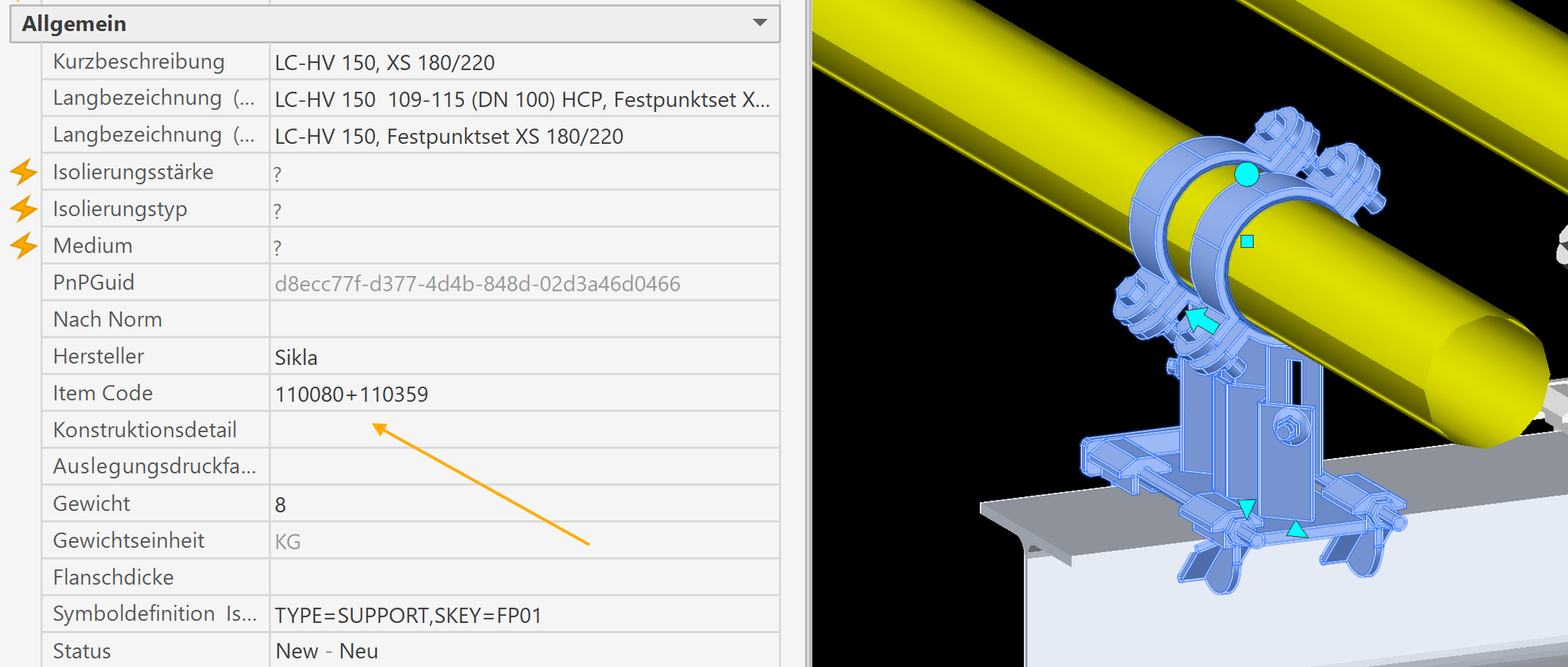
Related function
This setting belongs to the function 4.2.22. Dynamic properties (SuCri2DynamicProperties).
Copyright © 2026 by IntegaDesign GmbH. All Rights Reserved.