4.3.8. Tolerance setting (SuCri3SetTolerance)
On this page
Overview
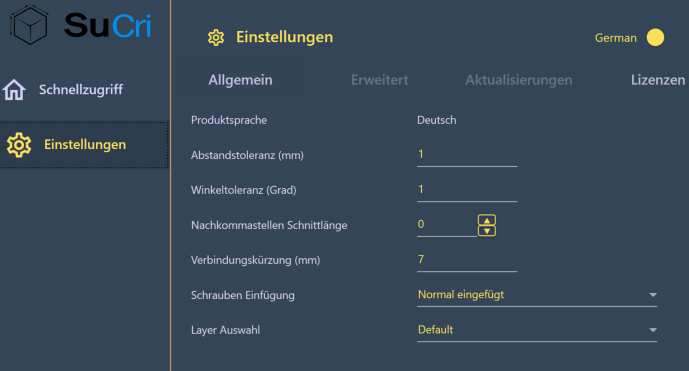
With the tolerance settings you define how precisely selected profiles must be positioned relative to each other for SuCri to offer a connection. Without any significant tolerance, distance and angle must match practically exactly. With a larger tolerance, connections are also created if a profile is slightly rotated or offset.
There is no separate command SuCri3SetTolerance in the current version. The values are entered in the Module 3 settings.
Where can I find the function?
In the Module 3 window under Settings > General. Alternatively in the SuCri Settings window (SuCri tab, Settings group, or command SuCriSettings) on the Module 3 tab.
Plant 3D™ command
Property | Value |
Command | No separate command available; SuCri Settings window via |
Icon | |
Module 3 window | Settings > General > Distance tolerance, Angle tolerance (degrees) |
From version | SuCri 25.1.1.1 |

Video: Tolerance settings in practice
How it works in detail
There are two values:
- Distance tolerance: maximum permissible distance deviation when checking whether the selected profiles meet or lie in one plane and whether their distance matches a connection. Default value 0.01.
- Angle tolerance (degrees): maximum permissible angle deviation when comparing the angle between the selected profiles with the angles that a connection supports. Default value 0.01.
Both values determine which connections the connection dialog offers. If the deviations are outside the tolerance, no connection is offered for these profiles, and the dialog returns to the selection page without a result. If only the distance does not match, the command line states the required and the current distance.
The video shows this using a right-angled T connection: it works at first. If a profile is rotated by 0.1, the connection can no longer be created. After raising the tolerance to 1, the same connection succeeds.
Changes are saved immediately and apply to all subsequent connections.
Application examples
Example 1: Connection is unexpectedly not offered
A connection looks correct in the model but is not offered. Raise the tolerance as a test. If the connection is then created, the cause was the accuracy of the profile position and not the profile selection.
Example 2: Adopted design
An adopted steel structure is not exactly aligned. A suitable tolerance makes it editable without you having to straighten every profile first.
Tips and best practices
- As small as possible: A generous tolerance masks inaccuracies in the model. Only increase the values as far as necessary.
- Consider distance and angle separately: It is often sufficient to adjust only one of the two values.
- Read the command line: If the command line states a required distance, moving the profile by the specified difference is often the better solution.
Troubleshooting
- Value is not applied: The input fields apply the value when you leave the field. After entering the value, click in another field.
- Command SuCri3SetTolerance unknown: The command does not exist in the current version. Use the settings.
Related articles
- Module 3 (P3D), overview of all functions of Module 3 in Plant 3D™.
- Troubleshooting Module 3 (P3D), known problems and solutions for Module 3 in Plant 3D™.
Copyright © 2026 by IntegaDesign GmbH. All Rights Reserved.