4.5.22. Show front view (SuCri4ShowSUFrontView)
On this page
Overview
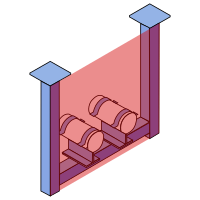
Show front makes the defined front views of all assemblies in the model visible, displayed as red faces. With many assemblies that each have their own front view, this is the only quick way to keep track.
Where can I find the function?
In the Module 4 window under Drawings, there Show front. Alternatively via the command line with SuCri4ShowSUFrontView.
Plant 3D™ command
| Property | Value |
|---|---|
| Command | SuCri4ShowSUFrontView |
Icon | |
| Ribbon | SuCri tab, Module 4 group, in the Module 4 window under Drawings. |
| Keyboard shortcut | No default shortcut |
| From version | SuCri 25.1.1.1 |
Video
How it works in detail
After calling the function, red faces show how the front view of an assembly is defined. If the red face is missing for an assembly, no front view of its own has been defined and the default view from the front applies.
Resetting is just as easy: select the red face and delete it. The default view then applies to this assembly again. Calling the command again hides the display.
Application examples
Example 1: Overview before deriving
Before creating several drawings, you check which assemblies have their own front view and which do not. If one is missing, you define it beforehand instead of repeating the derivation later.
Example 2: Correcting the viewing angle
A view shows the assembly from an unfavorable angle. You delete the red face and define the front again.
Tips and best practices
- No red face means default: This is not an error but the default setting.
- Deleting resets: No separate reset command is needed.
- The same command hides: Calling it a second time clears the display again.
Related articles
- Module 4, overview of all functions of Module 4.
- Selection, shows what currently belongs to the assembly.
Copyright © 2026 by IntegaDesign GmbH. All Rights Reserved.